
The agency version of the lead problem
An agency's lead problem is a multiplier of its clients' problems. Every client has its own website forms, marketplace feeds, CRM, and reporting expectations. The agency inherits all of them, then adds its own: proving to each client that the leads it generated were real, were routed, and arrived.
- Leads scatter per client One client's leads arrive by webhook, another's by marketplace feed, a third's by email, and each goes to a different CRM.
- Nobody can prove delivery When a client asks why a lead never appeared in their CRM, the agency reconstructs the answer from the sender's logs and the CRM's logs, if both exist.
- Junk damages trust One client's spam flood becomes the agency's quality problem the moment it lands in the client's CRM.
- Reporting reconciles badly GA4 says one count, the CRM says another, and the agency's monthly report explains the gap by hand.
- Access is all-or-nothing Client managers need to see their client's leads without seeing every other client's.
- Scale multiplies setup work Every new client repeats the same intake, routing, and reporting configuration by hand.
Short answer: Lucidity models the agency directly. One Agency workspace, one client group per client, each client business with its own intakes, destinations, pixel, GA4 link, and reports. Validation and delivery evidence run once, centrally, for every client. See how it compares in Lucidity vs WhatConverts and lead management for agencies.
One client, from website inquiry to CRM handoff
Start with one client business rather than connecting the whole roster at once. The example below uses a fictional client and synthetic records in the real Lucidity dashboard. It illustrates setup and operator decisions, not a live CRM integration test.
- Choose the client business. Keep the client's intake and destinations under that business. Confirm the selected business before configuring either end.
- Connect the entry point. In Integrations, configure the client's website or provider intake. Submit a safe test inquiry and confirm its source and business association. Do not publish the intake token or a real person's contact details.
- Review validation. Open the lead and inspect the evidence. Review and Discarded leads do not qualify for automatic delivery. Use Qualify and send only after an operator has checked a lead held for review.
- Confirm destinations. Enable only the destinations that should receive this client's leads. Default forwarding sends to all enabled destinations for the business; it is not a round-robin assignment to one sales representative.
- Check the handoff. Open Forward history. The fictional Demo CRM webhook below has a failed attempt followed by a successful one. Keep both outcomes when explaining the incident to the client; a success response does not prove that their sales team followed up.
- Scope access. Give a client user a business-scoped membership rather than workspace-wide access. Verify the businesses they can see before sharing the report. A workspace-level agency member may have broader access.
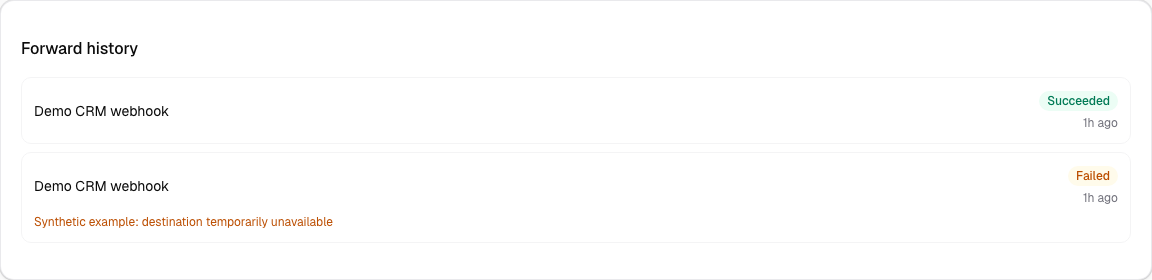
See the complete failure and recovery walkthrough for the example's timestamps, response codes, operator action, and limits. For a repeatable rollout, use the agency operating guide.
How Lucidity models an agency
A workspace is the access container, and Lucidity has three types: Direct for one operator, Group for an organization managing its own businesses, and Agency for a team managing businesses for external customers. Inside an Agency workspace, every client business belongs to exactly one client group, and each business is the operating unit: its leads, destinations, tracking, analytics, primary website, and active GA4 property link all belong to it directly.
Memberships scope people per workspace, client group, or business. A client's own manager can be granted access to just their business. An account lead can see every client group. Nothing about that access model is retrofitted; it is the same model the whole product runs on.
Per-client routing without per-client work
Routing is configured per business, so each client's leads flow to that client's destinations: HubSpot for one, Salesforce for another, ServiceTitan or Housecall Pro for home services clients, HighLevel for those running on it, Pipedrive, Zoho, Airtable, Google Sheets, Slack, Teams, Zapier, Make, a generic webhook, or ADF and standard email. Every delivery attempt to every destination is recorded, with resend and reprocess controls.
Each client uses the same evidence model, with validation settings and destinations configured for its business. A duplicate signal can send an inquiry to review rather than silently discard it. The delivery guide explains what a destination response proves and when an operator needs to investigate.
Lead quality as an agency service
Validation runs on every lead before routing: phone, email, address, name, duplicate, source, attribution, and history checks, each with status, confidence, and reason codes, resolving to a qualified, review, discarded, or error outcome. Discarded leads stay out of the client's CRM, with a reason recorded. Ambiguous leads wait in review instead of being silently dropped or delivered.
For agencies, that is a deliverable: "we filter and verify every lead before it reaches you," backed by records a client can audit. The policy details are in the lead qualification checklist and lead validation services guides.
Reporting that cites evidence
| Reporting need | How Lucidity covers it |
|---|---|
| Automated client reports | Report subscriptions per business and cadence: durable report runs for a closed period, delivered to the recipients you choose. |
| Freshness you can state | Each report run tracks data freshness separately for Lucidity's first-party facts and GA4 traffic context, so a report can say what it covers honestly. |
| Cross-client visibility | Roll-up analytics across the businesses a membership can see, for the agency view on top of per-client reports. |
| Traffic context | A Google connection authorizes GA4 access at the workspace level, and a GA4 property link binds each client business to its property, keeping client traffic contexts separate. |
| AI-assisted analysis | The read-only MCP server lets an AI client answer questions across the businesses, leads, and deliveries a user can access. See the MCP connection page. |
GA4, honestly, per client
GA4 reporting is where agency reports usually go to die, because GA4 is treated as the source of truth for numbers it cannot own. Lucidity keeps the two apart: lead and delivery facts are first-party and current; GA4 provides traffic context that may lag. Each client business binds to its own GA4 property through a property link, so client traffic never crosses. The reconciliation model is documented in lead source attribution and tracking qualified leads in GA4.
Pricing per client business
Lucidity pricing is based on the client businesses you manage. There is no public plan table; request a quote for your client roster. Confirm the billing-period terms before adding or removing a business. Your workspace's Plan & billing screen shows the current quantity and estimated monthly total.
When an agency should not choose Lucidity
If your clients' leads are overwhelmingly phone calls, a call tracker such as CallRail, WhatConverts, or CallTrackingMetrics is the primary tool, and Lucidity complements it rather than replacing it. If the agency's core business is generating and selling leads across buyers, a distribution platform such as Phonexa or LeadsPedia fits better; see Phonexa alternatives. The Lucidity review states the full limits, including no call tracking and no self-serve signup.
Frequently asked questions
Can one agency manage many clients in Lucidity?
Yes. An Agency workspace manages businesses for external customers. Every business belongs to one client group and owns its intakes, destinations, pixel, GA4 link, and reports, while memberships scope access per workspace, client group, or business.
How does agency pricing work?
Pricing is based on the client businesses you manage. There is no public plan table. Request a quote for your roster and confirm the billing-period terms before adding or removing a business.
Can each client keep its own CRM?
Yes. Destinations are per business, so clients receive leads in whichever CRM they use, from HubSpot and Salesforce to ServiceTitan, HighLevel, Pipedrive, Zoho, Airtable, Google Sheets, or a webhook or email, each with recorded delivery attempts.
What should agencies use for call tracking?
Lucidity does not track calls. Pair it with CallRail, WhatConverts, or CTM for call-heavy clients and forward their lead notifications into a Lucidity webhook intake for validation and routing. The comparison pages cover the combinations.
Run one client month as a pilot
Bring one client's forms, feeds, and CRM destination. Watch Lucidity validate, route, and prove every delivery, then scale the same setup across the roster.
Request an agency demo